Gear Reviews

Selecting the best dive computer for Atlantic conditions: Suunto, Garmin or Mares compared

Selecting the best dive computer for Atlantic conditions: Suunto, Garmin or Mares compared

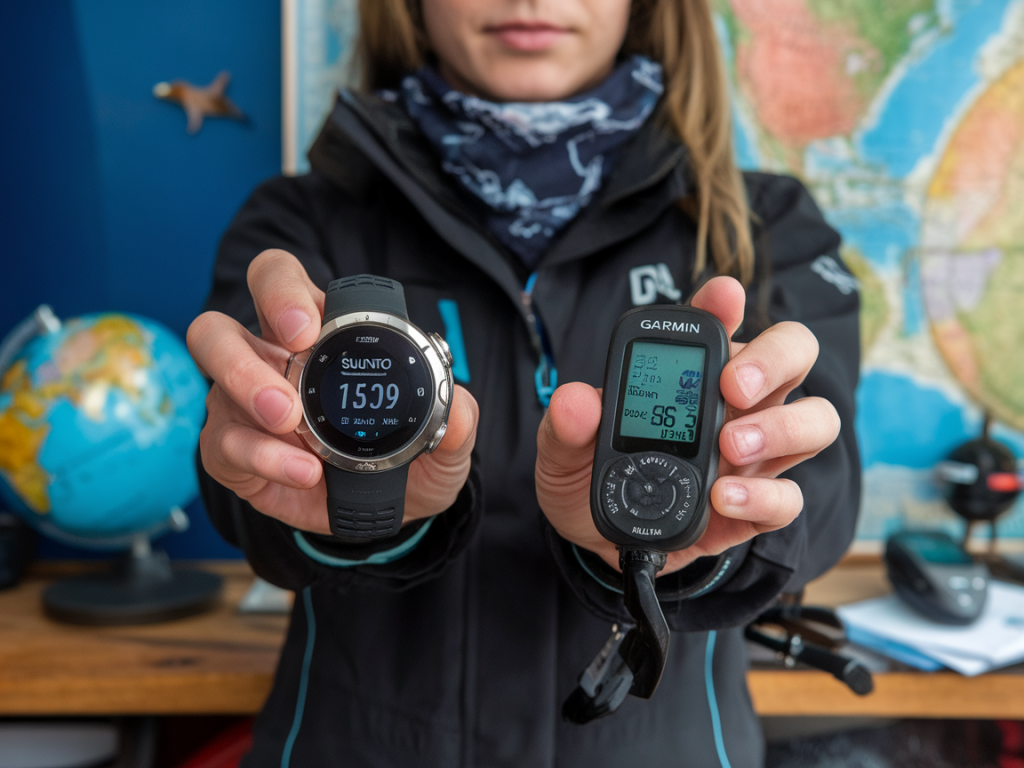
I get asked all the time which dive computer I recommend for diving around Lanzarote and the rest of the Canary Islands — and it’s a fair question. Atlantic conditions here can be changeable: strong surge at the reefs, chilly thermoclines, bright surface glare, and long days of multiple dives. Over the last decade I’ve taken Suunto, Garmin and Mares computers on hundreds of guided dives, freedives and shore entries. Here’s how I think about choosing the right unit for our waters and what each brand does best.

What really matters in Atlantic diving

Before comparing models, I want to be clear about the priorities I consider for Atlantic-style diving around Lanzarote:

  • Readable display in sun and low light — surface glare is real and many dives end in dim rock overhangs.
  • Accurate algorithm and responsiveness to multi-day diving — we often do two-tank days, snorkel-surfacing, and later afternoon dives.
  • Good glove-friendly controls — we use thick wetsuits in winter and gloves during cold-water thermoclines.
  • Battery reliability and serviceability — rechargeables are convenient but user-replaceable batteries can be handy on extended trips.
  • Wireless tank pressure integration — I like air integration for guided groups; it simplifies gas checks and planning.
  • Ruggedness and water resistance — volcanic sand and rough entries are common here.
  • Keep these in mind as I walk through how Suunto, Garmin and Mares approach those needs.

    Suunto — simplicity, strong algorithms, and great visibility

    My experience with Suunto units (D5/D6 and newer models) is that they feel built by divers for divers. The screen readability is excellent — high contrast, clean layout — which matters when you’re surface-swimming into bright late afternoon sun. Suunto’s algorithms tend to be conservative and predictable, which I prefer for repeated dives over a week. That means fewer surprises from the computer and a comfortable safety margin when current means you finish a dive a little longer or deeper than planned.

    What I like:

  • Clear display and intuitive dive screens — no fiddly menus under rough conditions.
  • Reliable multi-day dive handling and a sensible decompression model.
  • Rugged build — they stand up to sand and frequent boating entries.
  • What to watch for:

  • Limited smartwatch-style features compared with Garmin.
  • Some models have user-replaceable batteries, others are rechargeable — check which fits your travel style.
  • Garmin — feature-rich, excellent connectivity

    Garmin’s Descent line (for example Descent Mk2i) brings a different philosophy: it’s a dive computer that is also a full smartwatch. If you like activity tracking, navigation, and strong surface features alongside diving, Garmin is compelling. The Mk2i adds reliable air integration (up to several transmitters), an accurate GPS on surface, and top-tier mapping — useful when planning boat pickups or navigating long coastal swims.

    What I like:

  • Air integration and multi-gas capabilities — good when managing groups and different tanks.
  • Strong GPS and surface navigation — handy for marking shore entries on winding Lanzarote coasts.
  • Comprehensive logging and mobile app — easy for trip reports and sharing photos from the surface.
  • What to watch for:

  • The user interface is denser; menus can be fiddly with gloves on.
  • Price is generally higher than basic computers.
  • Battery life under heavy smartwatch use can be impacted — however, in pure dive mode it performs reliably.
  • Mares — practical, cost-effective, direct user controls

    Mares offers solid, no-nonsense computers like the Puck Pro and more advanced models. They tend to be very practical: large, readable displays, straightforward buttons, and competitively priced. For dive centres and rentals around the Canaries I often see Mares units because they’re robust and easy for beginners to operate.

    What I like:

  • Excellent price-performance — you get essential features without paying for extras you won’t use.
  • Large screens and simple modes — good for teaching and for divers who prefer minimal setup.
  • Typically easy glove-friendly buttons.
  • What to watch for:

  • Less polished app ecosystems than Garmin.
  • Air integration and multi-gas support vary by model — check specifics if you want transmitters.
  • Quick model comparison

    Feature Suunto D5/D6 (and similar) Garmin Descent Mk2i Mares Puck Pro / Smart
    Display readability Excellent, high contrast Very good, rich color Good, large digits
    Battery Some rechargeable, some replaceable Rechargeable (long life in dive mode) User-replaceable common on entry models
    Air integration Available wireless transmitters Top-tier: multi-transmitter support Available on higher models, variable
    Glove-friendly controls Good OK (complex menus) Very good (simple buttons)
    App & connectivity Good with Suunto app Excellent (Garmin Connect + Descent app) Basic to good
    Price range Mid to high High Low to mid

    Tips from my dives in Lanzarote

    Here are practical tips drawn from guiding and testing gear around the island:

  • If you do long surface swims between entry points or boat pickups, a Garmin with GPS can save you time and worry.
  • If you prefer a predictable conservative algorithm and an uncluttered display when currents push you deeper unexpectedly, I reach for Suunto.
  • For students, rental fleets or first-timers on a budget, Mares gives reliability without overcomplication.
  • Consider whether you want rechargeable vs user-replaceable battery. For week-long trips where charging isn’t convenient, a replaceable battery is less stressful.
  • Test button operation with the gloves you actually wear. A perfect screen is useless if you can’t change mode underwater.
  • Buying checklist

  • Decide if you need air integration and how many transmitters you might use.
  • Check the model’s gas support (single nitrox, multi-gas, trimix if you plan technical dives).
  • Confirm battery type and expected life; bring a charger or spare batteries on long trips.
  • Try the user interface in a shop with gloves on or watch video tutorials to ensure you’re comfortable.
  • Look for local service and warranty support — having a Canary Islands-friendly dealer or service point is very useful.
  • Choosing a dive computer is personal — your diving style, how much tech you want on your wrist, and whether you guide or teach will shape the best fit. If you’d like, tell me the usual dive plans you do around Lanzarote (shore vs boat, single vs multi-tank days, use of nitrox) and I’ll recommend one or two specific models that match your needs and budget.
    You should also check the following news:

    How to plan a family-friendly snorkel day from Playa Blanca with toddlers and non-swimmers
    Snorkeling

    How to plan a family-friendly snorkel day from Playa Blanca with toddlers and non-swimmers

    Taking toddlers and nervous non-swimmers snorkeling from Playa Blanca is one of my favourite...

    How to train breath-hold and safety drills for freediving in Lanzarote’s shallow bays
    Diving

    How to train breath-hold and safety drills for freediving in Lanzarote’s shallow bays

    I spend a lot of my time in Lanzarote’s shallow bays — Papagayo, Playa Chica, Playa Honda and...